Digital Audio Workstations

Electronic musicians make use of a wide variety of instruments, equipment, software and techniques, often varying with each project or performance. Much of their work, however, centers around a specific type of software environment: the digital audio workstation or DAW.
Sequencers
Electronic music studios in the late twentieth century often relied on standalone synthesizer units in the form of keyboard synthesizers or rack-mounted units. These instruments could be coordinated to create an automated musical performance by a separate controller device called a sequencer.


With the advent of personal computers, hardware sequencers were commonly replaced by software that served the same function. These programs relied on Musical Instrument Digital Interface or MIDI, a communications standard which allowed computers, digital instruments and other devices to send instructions to one another.
A MIDI sequence — a performance recorded into or generated by a sequencer — consists of a series of instructions to be sent to one or more MIDI devices. Because sequences are lists of commands, all aspects of the performance can be edited: characteristics of individual notes, including attacks, releases, velocities and pitches can be changed, added or removed. A given sequence can be assigned different sounds, or even sent to a different device.
Software sequencers generally display performance data in piano roll notation, in which individual notes are displayed as horizontal bars on a graph with pitch as the vertical axis and time as the horizontal axis. These bars can be moved or resized to change pitch and timing, and might use color, opacity, or other techniques to display characteristics like volume. Sequencers will usually allow the creation of multiple tracks of MIDI data, where different tracks can be assigned to different instruments.
Sequencers will also include controls that apply to all tracks: play, pause, stop and recording buttons, controls to adjust the tempo of recording and playback, and features like metronome clicks and providing a count-off before recording. The current playback position is shown by a vertical cursor, which can be moved by the user with the mouse or keyboard controls.
Software Synthesizers
Advanced computer hardware eventually made it possible for sequencers to use software synthesizers either with or instead of external synthesizers. Some of these utilities generated sounds programmatically, while others relied on samples of acoustic instruments. Software synthesizers were usually available as plug-ins to sequencers or other music software, and operating systems like Windows and macOS eventually incorporated software synthesizers by default.
Digital Audio Editors
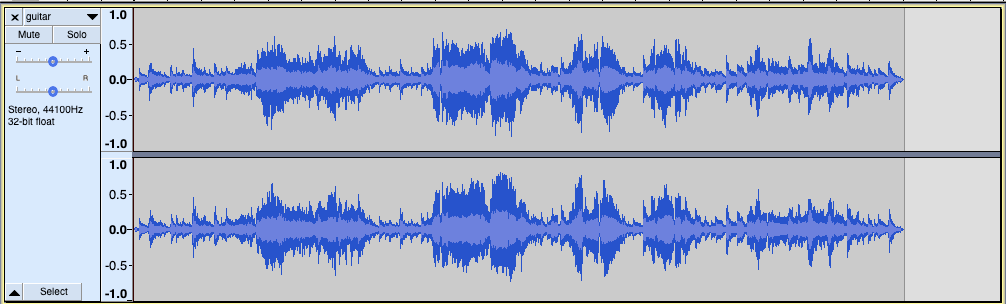
Digital audio editors are programs that allow for the creation or manipulation of digital audio. These utilities will often represent sound with a soundwave diagram, where a single continuous line graph portrays amplitude on the vertical axis against time on the horizontal axis. Users can cut, copy and paste portions of the sound using a graphic interface, apply effects to portions of the sound, and work with multiple channels of audio displayed as separate horizontal tracks. Like sequencers, digital audio editors include controls to play, pause or stop the audio, a button to record audio through a specific audio input, and a vertical cursor that shows the current playback position.
Modern DAWs
While separate software sequencers and digital audio editors still exist, many current programs combine their functionalities into a single type of application called a Digital Audio Workstation or DAW.
Most modern DAWs retain the track layout used by sequencers and digital audio editors, where a channel of audio is represented by a horizontal scrolling area. Sequences and digital audio tracks can be interleaved, and when a new track is created the user is given the option of setting it as a sequencer track or a digital audio track.
Individual tracks are given track-specific controls, often displayed along the left side of the window. These usually include a user-editable name for the track, a volume control, a panning control, a mute button which temporarily silences only that track, and a solo button which temporarily mutes all other tracks.
Loops
In addition to sequencing and digital audio capabilities, modern DAWs often include a library of short, prerecorded performances or sounds which users can add to their compositions by dragging into the tracks area of the window. Because in many cases, these segments — either sequence-based or audio-based — are designed to be repeated continuously, they are generally referred to as loops.
By using loops, users can quickly build accompaniments like drum set tracks and bass lines for recorded performances. In many cases, these loops are designed to adapt to different tempos or even other keys. Loops provided with DAWs are generally provided royalty-free, and expansion packs are sometimes available at varying costs to the user.
Plug-ins
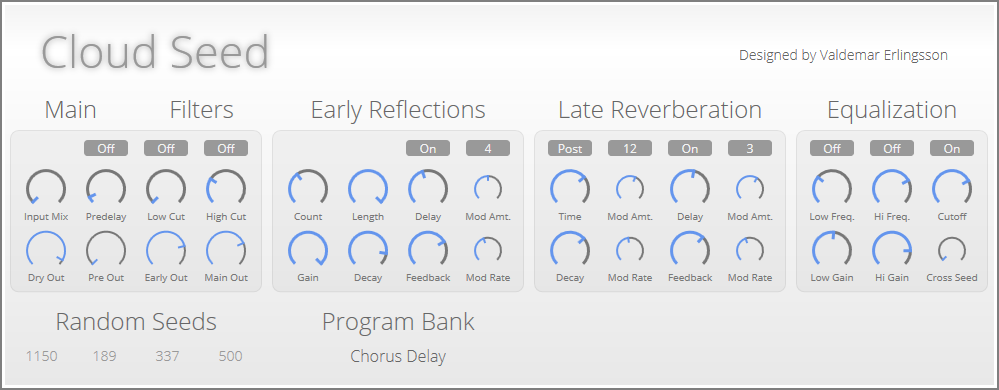
Most DAWs, as well as standalone sequencers and digital audio editors, can be extended by the use of audio plug-ins. These are utilities which are not independent programs, but which add capabilities to other audio programs in different ways: by creating audio through sampling or synthesis, by applying effects to existing audio, or by providing audio analysis. Plug-ins may use simple text-based commands or they may have complex graphic interfaces.
There are thousands of plug-ins available for purchase from audio software publishers or as free downloads from individual developers. Many older hardware synthesizers and effects units can be found in the form of audio plug-ins, often with interfaces designed to visually reflect the instrument's physical control surfaces.
There are several standard formats used by audio plug-ins: VST, a format designed by Steinberg Media Technologies, and Audio Units, a format maintained by Apple, are two of the most commonly used. Most DAWs support one or both of these formats, allowing plug-ins to be shared by different audio editing environments.
Live Performance
While many DAWs were originally designed for studio composition, they can also be used for live performance. Certain DAWs, like Ableton Live, are designed with interfaces which specifically support live performance.
One common method of performing with a DAW involves creating prerecorded segments beforehand, and assembling them live on stage using a laptop computer, either as an accompaniment for other performing instruments or as a standalone piece. Another common technique is recording segments of a performance on stage and using a DAW to layer the segments as they are being recorded. This process, called live looping, often involves the use of hardware controls like loop pedals.
Other Audio Software
Other types of audio software that electronic musicians use of include scorewriters — programs which are designed primarily for creating music notation, like Finale or Musescore — and audio development environments which allow the development of musical instruments or utilities using a programming language, like Max/MSP and Pure Data.
Digital Audio Workstations: Summary
- A sequencer is a device or program which coordinates other electronic musical instruments to create a performance.
- Early hardware sequencers controlled all aspects of the performance and were limited to short, repetitive phrases.
- Software sequencers use MIDI to record and send commands to external synthesizers.
- A MIDI sequence is a list of timed commands that can be sent to one or more synthesizers to create a performance.
- Software synthesizers provide the functionality of external hardware virtually, and can be used by sequencers as built-in features or plug-ins.
- Digital audio editors allow for the manipulation or creation of digital audio.
- Digital audio editors usually display audio files as soundwave diagrams, allowing the user to cut, copy and paste portions of the file.
- Modern digital audio workstations or DAWs combine the functionalities of sequencers and digital audio editors.
- Most DAWs use a track format, where channels of audio are displayed horizontally.
- Track-specific controls in DAWs include mute and solo buttons, as well as controls for volume and panning.
- In addition to sequencing and digital audio manipulation, many DAWs provide a library of short, flexible, prerecorded performances called loops which can be used to easily construct larger compositions.
- Most DAWs can be extended by the use of plug-ins, which can provide sounds, effects, or analytical tools.
- Some DAWs are specifically designed to support live electronic performance, using techniques such as live looping, where a musician builds a multi-tracked performance using a DAW and a solo instrument or voice.
- Other audio software includes programs like scorewriters and audio development environments.