Samplers


A sampler is a musical instrument that, like a synthesizer, generates sounds electronically. Instead of building sounds by combining basic waveforms, however, a sampler plays individual audio recordings for each note played.
Sampling Fundamentals
Because samplers create sound using audio recordings, they require some form of data storage.
File Storage
While a few early samplers made use of magnetic tape, beginning in the 1970s units made use of disk-based storage — either floppy disks which allowed the user to switch sounds by exchanging disks, or hard disks built into the unit or connected to it for storing larger files.
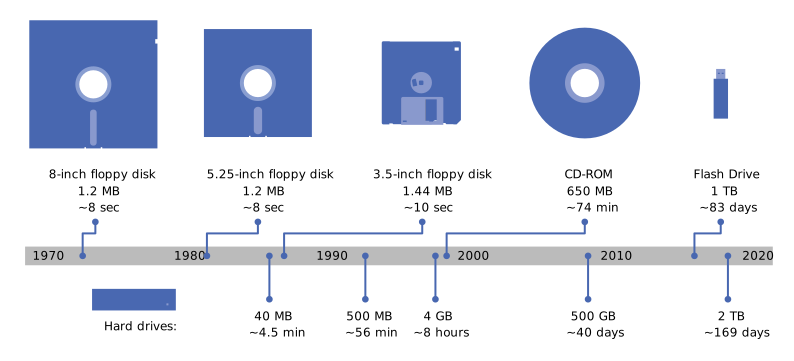
Digital audio requires large file sizes, and samplers used special techniques to work within the limited storage capacities of early computer disks.
Compression
Because audio files contain a large amount of data — one minute of high-fidelity stereo sound requires about 10 MB of storage space — some samplers use audio compression techniques to reduce file sizes. Some of these techniques include removing the highest and lowest frequencies of sound, or "rounding off" finer details, a process which sacrifices sound quality for smaller files.
Key Mapping
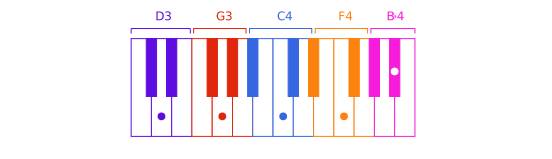
A sample could theoretically use a single recording — for example, the recording of a cello playing the note F3 — and pitch-shift it to match other notes across the frequency spectrum. However, because changing an audio file's pitch also changes its speed, this causes speed distortions for notes at large intervals from the original pitch.
High-quality samples will sometimes include a separate audio recording for every pitch, but these samples have much larger file sizes as a result.
As a compromise, most samples use multiple recordings, but pitch-shift them to cover small groups of nearby pitches. The process of specifying which samples are used for particular pitches is called key mapping.
Sample Design
Creating a sample from a recording — or set of recordings — requires a unique process.
Recording
Recording processes for a samples require a careful approach. For a piano sample, for example, a recording engineer will likely select a high-quality instrument like a concert grand piano and ensure that the instrument is tuned and ensure that all its mechanisms are in good repair.
The recording itself is generally done in a controlled acoustic environment like a recording studio. Any background sounds or even ambient sound will be captured in the sample and sound unnaturally repetitive when the sample is used to create a piece of music.
In some cases, engineers create samples to capture a particular individual instrument, perhaps one with historical significance. Some instruments, like pipe organs, must be recorded on location, which requires more significant challenges for the engineer.
Stitching
Professional samples will sometimes include multiple variations of a particular sound, such as different articulations of a single pitch. However, it would be impractical — if not impossible — to record every possible length of note for a sample. Instead, sample recordings are designed to have three parts: an attack, a body, and a release.
When a performer plays a note, the attack portion is first played, and then the body of the sound is repeated until the note is released, at which point the release portion is played. The exact dividing points between the sections must be located so there is a smooth transition from attack to body and body to release. Further, the end of the body must segue to the beginning of the body so the body section can be repeated as many times as necessary. This process is called stitching.
The most effective way to stitch sounds together is to ensure that the dividing lines are at zero points on the waveform. This prevents "jumps" in the waveform, which translate into audio as clicks or pops.
It can be challenging to find the right length for the body of a recorded sound. If the body is very short, it can introduce an unnatural pulse to the sound. A long body can provide a more expressive, full-bodied sound, but releases will not be as responsive to the user's control.
Special Features
Some samplers support more advanced features. For example, a sample might be designed to have a steady body that switches to a vibrato when a key's aftertouch is engaged. A complex string sample might include multiple articulations, like regular bowings, pizzicato, and col legno.
Samplers: Summary
- A sampler is an electronic musical instrument that plays audio recordings for individual notes.
- Because samplers rely on audio recordings, they must have a method of storing digital audio.
- Older samplers were limited in sample size and quantity due to the relatively high storage requirements of digital audio.
- One method for maximizing storage space for audio is the use of audio compression.
- Another method is key mapping, in which a single audio sample is pitch-shifted to use for a limited range of notes.
- To use a digital audio recording as a sample, certain procedures must be followed.
- Recordings must be made in carefully controlled environments to eliminate extraneous noise.
- So that they may be adapted to notes of varying lengths, audio recordings are split into at least three segments: an attack, a body, and a release.
- The various segments of a sound must be spliced so that waveforms are not interrupted when they are combined with one another; cutting waveforms at zero points simplifies this.
- Some samplers support samples with advanced features, such as changing the tone in response to a key's aftertouch.